Setup of OAuth App
tip
To set up an API key / OAuth App, you will need to set up a 2FA (SMS).
You will be guided through the process - please have a mobile phone ready for this.
Set up steps
The API uses OAuth 2.0 Client Credentials flow for authorization.
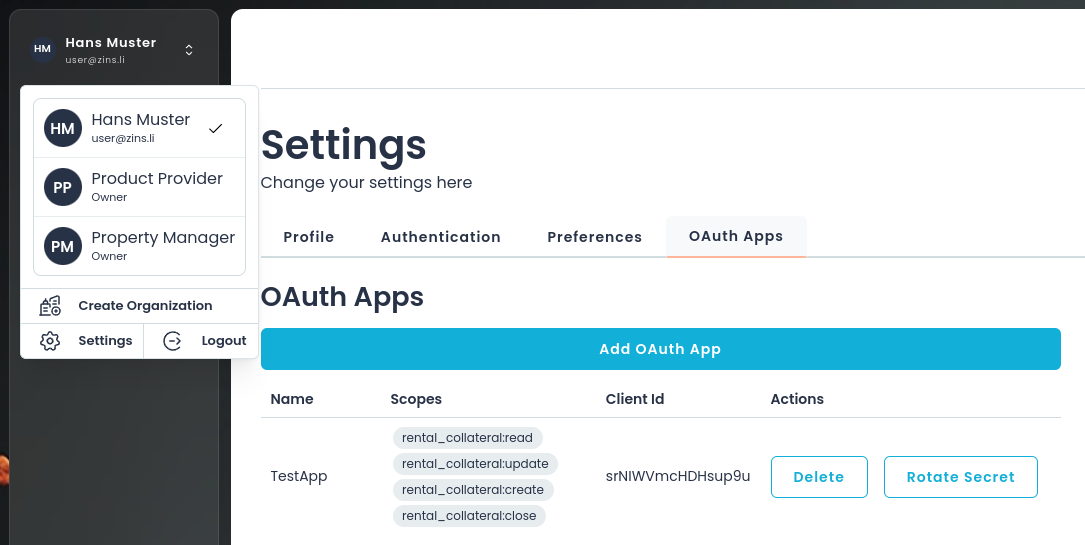
- To access the API, you can create an OAuth app under your user settings (see below).
- You will be asked for an SMS login code. If you have not set up this 2nd factor yet, you will be guided through the process to set it up.
- Once authenticated, create a new key with a required scopes, to get the
client_idandclient_secret - Use these credentials to get a token from
/v1/user/auth/tokenendpoint. - With every request, send the token in the header as an
Authentication: Bearer <token>
Scopes
Depending on your role, you will need the following scopes:
Real Estate manager
For managing day-to-day processes via API:
product:readproduct:grantproduct:revokerental_collateral:readrental_collateral:createrental_collateral:updaterental_collateral:closerental_collateral.event_log:read
The if you plan to manage the members of your organization via API, the API key's user needs to have the system role 'owner' of the organization.
Financial Product Provider
For managing day-to-day processes:
rental_collateral:readrental_collateral:updaterental_collateral.event_log:readproduct:read
The if you plan to manage the members of your organization via API, the API key's user needs to have the system role 'owner' of the organization.